

Pick a template
Simple edition
Clean and straightforward. The safe default, and the one to pick if the handbook needs to survive being forwarded to your CFO.
Quirky edition
Same content, more personality. Works well where the company voice is already informal.
Read either one in full first: simple edition or quirky edition
Make it yours
1
Duplicate the template
Click Duplicate in the top right of the Notion page to copy it into your own workspace.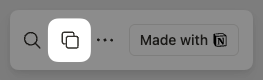
2
Fill in your specifics
Replace the placeholder text with your real channel names, your Portal link, your support email address, and the teams people can actually file with.
3
4
Trim to what you have configured
Cut the sections that do not apply yet. If no channel sends satisfaction surveys, drop that part. If nothing in your workspace needs sign-off, drop approvals. A handbook describing features people cannot find costs you trust on day one.
5
Share it
Set permissions, publish internally, and link it from your announcement and from the description of every support channel.
Next
Announcement templates
The Slack and email messages that point people at the handbook.
Rollout checklist
Where the handbook fits in the four-week launch plan.